
Ethiopian Bible
GeezAppsBooks & Reference
3.258.00 Reviews
- Version
- 2.5.0
- Installs
- 100.00K
- Age Rating
- Everyone
Screenshots
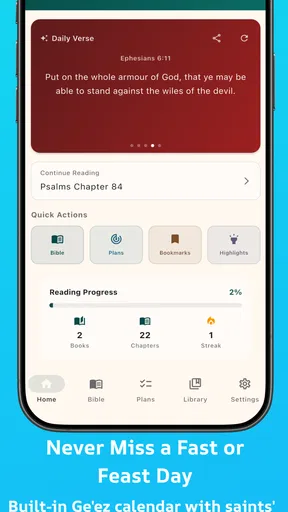
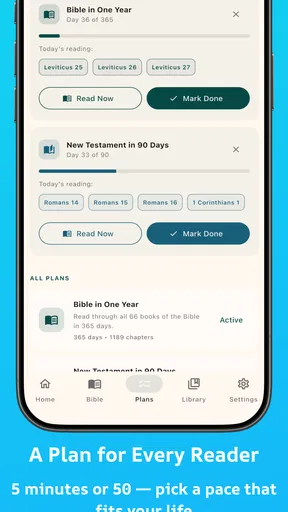
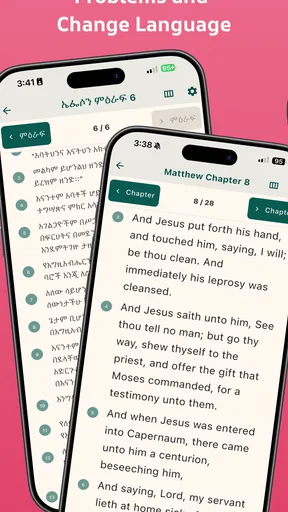
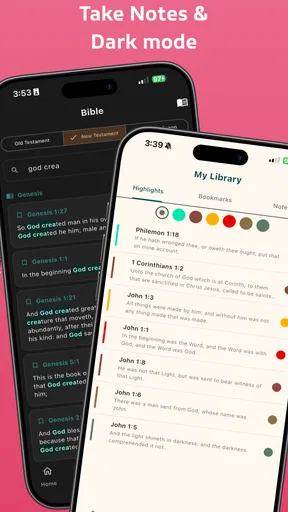
Our Review of Ethiopian Bible
 Analysis by Appyee
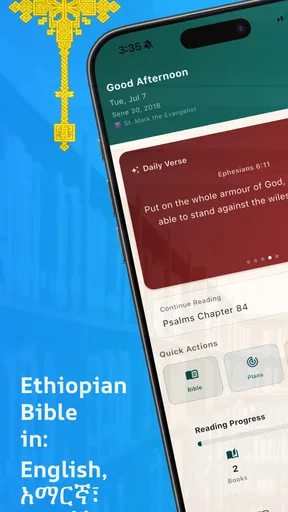
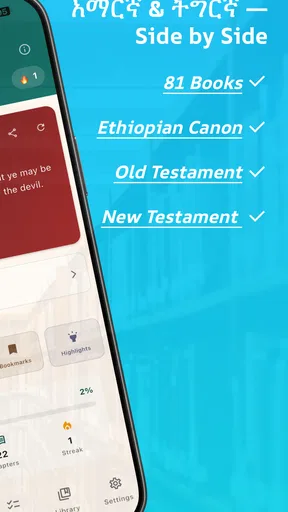
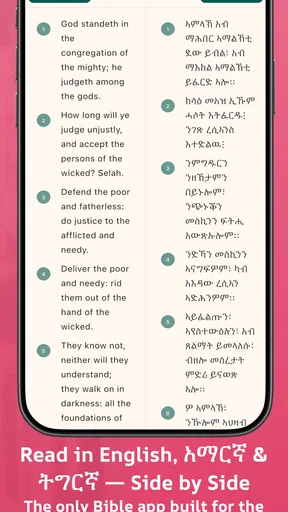
I approached Ethiopian Bible as a practical reading tool rather than as another app to install and forget. It belongs to the Books & Reference category, is free to use, and is designed around access to the Ethiopian Bible in English, Amharic, and Tigrigna. That combination gives it a clear purpose: keeping several language options together when I want to read, compare wording, or carry a Bible without bringing a printed volume along.
The app is developed by GeezApps and has reached more than one hundred thousand installs, so it is not an obscure experiment with no audience. At the same time, its average rating sits at 3.2 from roughly two hundred ratings, with about sixty written reviews. I read that as a reason to approach it with realistic expectations. The idea is useful, but the experience will matter most to people who specifically need these language choices and can accept a straightforward reading app rather than expecting a polished study suite.
How Ethiopian Bible feels in everyday use
I find Ethiopian Bible most useful when it becomes a shared reference rather than a phone passed around without a plan. In this section, I’ll look at how a household can make language choice and reading turns feel comfortable, especially when people have different habits or levels of familiarity. That leads naturally to the practical question of setting boundaries on a shared device.
A focused way to keep three languages close
The strongest part of the app is its identity. Many Bible applications try to cover a huge range of translations, study tools, devotionals, audio content, and community functions. This one is easier to understand. Its central value is having Ethiopian Bible material available in English, Amharic, and Tigrigna from one mobile starting point.
That focus can be especially useful in a household where people read in different languages. I can imagine one person reading an English passage while another prefers Amharic, or a learner using English as a reference while becoming more comfortable with Tigrigna. The app is therefore more than a replacement for a pocket book; it can also support a small, informal comparison workflow between languages.
I would not treat that as a substitute for formal translation study. A phone screen does not provide the same physical orientation as a printed Bible, and readers who need scholarly notes, cross-references, maps, or extensive commentary may find the experience limited. Still, for ordinary reading, quick consultation, and carrying the text during travel, its narrow focus makes sense.
A realistic daily scenario
Imagine leaving home for work, church, or a family visit and realizing that the Bible you normally carry is on a shelf. A free app with the relevant languages can solve that problem in seconds, provided the phone is ready and the text is easy to reach. During a conversation, I could also look up a passage without switching between separate language apps or searching the web for an uncertain result.
Another useful situation is reading with an older relative or a family member who is more comfortable in Amharic or Tigrigna. Instead of asking each person to use a different source, the same app can serve as a shared reference point. The value here is not flashy technology. It is reducing the small friction that often stops people from opening a text when they are away from home.
For personal reading, I would use it in short sessions: a morning passage, a quick reference before a discussion, or a quiet reading period while travelling. I would keep a printed Bible or a more feature-rich study application nearby when I wanted annotations, detailed navigation, or a broader research workflow.
What the language mix changes
English makes the app approachable for readers who want a familiar reference language, while Amharic and Tigrigna give it a more specific cultural and linguistic purpose. The three-language arrangement is the feature that separates this app from a typical English-only Bible reader. It also changes how I would recommend it: someone looking only for a general Bible app has many alternatives, but someone seeking Ethiopian-language access has a clearer reason to try this one.
There is a practical trade-off in using multiple languages on a small screen. Switching attention between versions can help with understanding, but it can also make a reading session feel less smooth if the controls are not immediately obvious. I would spend a few minutes learning how the language selection works before using the app in a group setting. That small preparation avoids interrupting a reading or discussion while searching for the desired version.
Useful habits for getting more from it
My first tip would be to choose a primary reading language before beginning a longer session. Constantly changing languages may be helpful for comparison, but it can break concentration. I would read the passage fully in one language first, then return to selected verses in another language when I wanted to examine wording or explain a point to someone else.
A second tip is to treat the app as a dependable access tool, not automatically as a complete study library. If I were preparing a sermon, class, or detailed theological discussion, I would verify quotations and consult additional references instead of relying on a single mobile presentation. This is a sensible habit with any digital Bible, especially when the app’s main promise is access to the text rather than an extensive research environment.
A third tip concerns group reading. Before a meeting, I would open the relevant passage and confirm that everyone is comfortable with the selected language. That sounds simple, but it makes the app more useful in real life. The three-language choice is a strength only when the reader actively uses it; otherwise, a simpler single-language reader may feel faster.
What the current release tells me
The current version is 2.5.0, and the app was released on February 14, 2026. Those details suggest a product that has moved beyond an initial launch and is being presented in a current, maintained form. I would still separate that fact from assumptions about future development. A version number alone does not promise particular improvements, a redesigned interface, or upcoming features.
For an existing user, moving to the current release is likely most relevant when the app store offers an update through the normal installation process. I would check the app after updating rather than assuming that my preferred reading position or language choice will behave exactly as before. That is not a criticism of this app alone; reading tools become frustrating when a familiar control moves or a saved habit no longer works.
The important point is that the present version should be judged on what it offers now: a free Ethiopian Bible app with English, Amharic, and Tigrigna access. I would not install it based on hopes that it will eventually become a full-featured study platform. If future releases add better navigation or deeper study support, that would be welcome, but it should remain an expectation rather than part of today’s recommendation.
Compatibility and accessibility considerations
The minimum operating system is Android 7.0, which makes the app relevant to people using older Android phones as well as newer devices. That is useful for families who do not replace phones frequently. A reader should still consider the condition of the device itself, including screen size, storage, battery health, and general responsiveness, because those factors can affect reading comfort even when the operating system is supported.
The content rating is Everyone, which fits the app’s intended role as a Bible reference and reading tool. I would feel comfortable recommending it as a family-accessible option, while remembering that the suitability of a reading format depends on the person using it. Younger readers may need help navigating language choices, and older readers may prefer a larger screen or printed text for longer sessions.
Because it is free, the barrier to trying it is low. That does not mean it will be the best choice for every reader. Someone who wants a highly polished interface, extensive personalization, or a large ecosystem of study resources may be happier with a different Bible application, even if that alternative offers fewer Ethiopian-language options.
Where it may fall short
The rating of 3.2 is the clearest signal that not every user has found the experience ideal. I would not use that number to dismiss the app, because a specialized language focus can be more important than a broad popularity score. Still, it tells me to pay attention to everyday friction: how quickly I can reach a passage, how clear the language controls are, and whether reading remains comfortable over time.
The app’s focused scope may also feel restrictive to readers accustomed to modern Bible platforms. If I want extensive notes, a strong search system, synchronized study across devices, audio, reading plans, or a large collection of translations, I would compare alternatives before settling here. Ethiopian Bible is better understood as a focused access point than as an all-in-one religious library.
There is also a difference between owning a digital text and building a study routine around it. The app can make the Bible available, but it cannot decide which passages to read, explain difficult context, or replace personal reflection and discussion. Readers who expect the application to guide every step may find it too bare. Readers who already know what they want to read may appreciate that it stays close to the main task.
Who should install it
I would recommend it first to readers who specifically want Amharic or Tigrigna alongside English. It is also a sensible option for households with mixed language preferences, travellers who want a compact reference, and anyone who needs a free way to keep an Ethiopian Bible close at hand.
It may suit a student or language learner who wants to compare familiar English wording with an Ethiopian language. The comparison should be used thoughtfully rather than as an automatic word-for-word language lesson, but having the passages together can make personal reading more flexible. It can also help someone decide which language feels most natural for a particular passage or setting.
I would be less likely to recommend it to a reader whose main priority is advanced study. If detailed commentary, elaborate cross-referencing, audio, extensive customization, or a refined note-taking system comes first, a broader Bible platform is probably the better choice. The same is true for someone who reads only English and does not need the app’s Ethiopian-language focus; that person may find another reader more convenient.
What I would watch in future updates
For future development, I would watch how GeezApps handles the balance between simplicity and usefulness. Better passage navigation would have an immediate effect because it improves every reading session without changing the app’s identity. Clear language switching would be equally valuable, especially for people who use the app in family or group settings.
I would also look for signs that the app is becoming more comfortable for regular reading without losing its accessibility on older Android devices. A feature is only an improvement if it helps readers reach the text more easily. Extra menus or complicated study layers could make a focused app less approachable, particularly for people who installed it simply because they wanted the Bible in a familiar language.
Existing users should judge updates by practical results rather than by version numbers. Does the passage open smoothly? Is the preferred language easy to select? Can a reader return to the text without unnecessary steps? Those questions matter more than a long list of additions. New users can apply the same test during their first session and quickly decide whether the app fits their habits.
My recommendation after using it
The best reason to choose Ethiopian Bible is its language focus, not a promise of a complete study ecosystem. I like that the app gives English, Amharic, and Tigrigna readers a shared place to access the text, and the free price makes trying it straightforward. Its support for Android 7.0 also keeps the door open for people using older phones.
My recommendation is positive but specific. If one of those three languages is central to your reading, I would install it and test a few familiar passages, try switching languages, and see whether the navigation feels natural on your phone. If your needs are broader, compare it with a full-featured Bible reader before making it your only reference.
In the end, this is a practical app with a clearly defined audience. It does not need to imitate every large Bible platform to be worthwhile. For the right reader, carrying Ethiopian Bible access in English, Amharic, and Tigrigna is a meaningful advantage. For everyone else, its narrower design may be exactly why another option feels more complete.
Verdict
Strengths of Ethiopian Bible
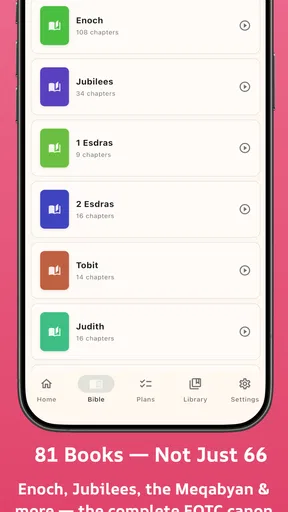
- Includes the complete Ethiopian Orthodox Bible in one app.
- Works offline, making scripture accessible without mobile data.
- Supports daily reading and personal Bible study routines.
- Easy access to books that are uncommon in standard Bible apps.
- Useful for readers exploring Ethiopian Christian traditions.
Limitations of Ethiopian Bible
- The interface may feel basic compared with modern Bible apps.
- Some translations or passages may be difficult for new readers.
- Search and navigation tools may be limited in certain versions.
- Ads may interrupt reading in the free edition.
- Content accuracy can depend on the app’s specific edition or source.
Similar Picks in This Category
View All
Google Play Books & Audiobooks
Google LLC4.7

네이버 - NAVER
NAVER Corp.3.5

Wattpad - Read & Write Stories
Wattpad.com3.7

King James Bible - Verse+Audio
Ozion4.8

Bible Offline-KJV Holy Bible
Bíblia Offline4.9

Amazon Kindle: Reading App
Amazon Mobile LLC4.8
Frequently Asked Questions
What is Ethiopian Bible, and what does the app offer?
Ethiopian Bible is a mobile reading app designed for people who want to access biblical texts connected with the Ethiopian Orthodox tradition on their Android or iOS device. Depending on the edition, it may include the Ethiopian Orthodox biblical canon, English or other language options, search tools, bookmarks, adjustable text size, and offline reading. Before downloading, check the store description to confirm the exact books, translation, and features included in the current version.
Does Ethiopian Bible include the complete Ethiopian Orthodox biblical canon?
The Ethiopian Orthodox biblical tradition is broader than many commonly used Protestant or Catholic Bible editions, and the exact contents can vary between digital publications. Some apps use the name Ethiopian Bible while offering only selected books or commonly recognized scriptures. For that reason, users interested in the complete canon should review the included-books list, edition information, and screenshots before installation rather than assuming every traditional text is available.
Can I read Ethiopian Bible without an internet connection?
Many Bible applications allow chapters or the entire text to be read offline after the required content has been downloaded, which is useful when traveling or using limited mobile data. However, offline availability is not guaranteed for every version of Ethiopian Bible. Features such as advertisements, synchronization, audio content, updates, or external links may still require internet access, so verify the app’s description and test offline reading after installation.
Is Ethiopian Bible free to download and use?
The app may be available as a free download, but free access does not always mean that every feature is included without limitations. Some versions can contain advertising, optional purchases, premium translations, audio tools, or additional study resources. Review the Google Play Store or Apple App Store listing carefully for pricing, in-app purchases, subscription details, and privacy information before downloading, especially if the device will be used by children.
What languages and reading features are available in Ethiopian Bible?
Language support depends on the specific application and edition. Some versions may provide English text, Amharic or other Ethiopian languages, while others may focus on a single translation. Common reading tools can include chapter navigation, keyword search, bookmarks, notes, highlighting, night mode, and adjustable font size, but these are not guaranteed. Check the latest store listing and screenshots to confirm that the language and accessibility options meet your needs.
